
Butterfly clicking is a popular technique among gamers looking to achieve higher clicks per second (CPS), especially in Minecraft PvP, FPS games, and other competitive gaming scenarios.
To maximize your performance, choosing the best mouse for butterfly clicking is crucial.

This guide will cover the best mouse for butterfly clicking, their features, and how to pick the right one for your needs.
What is Butterfly Clicking?
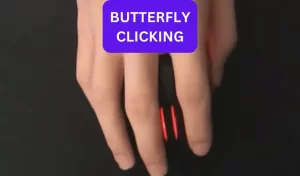
Butterfly clicking involves rapidly alternating clicks between two fingers (typically index and middle) on the same mouse button.
This technique allows players to register multiple clicks per second, reaching 15-25 CPS with practice. However, not all mice can handle this clicking method effectively.
A good butterfly clicking mouse should have durable switches, a comfortable design, and a high CPS limit.
Key Features to Look for in a Mouse For Butterfly Clicking
- Durable Switches: Look for Omron or Kailh switches, known for their longevity and responsiveness.
- High CPS Limit: Some mice have a built-in debounce delay that limits clicking speed. Choose a mouse that supports high CPS.
- Comfortable Design: Ergonomic shape and responsive buttons ensure extended gaming comfort.
- Customizable Software: Adjustable debounce time and macros can enhance clicking performance.
- Lightweight Build: A lighter mouse allows for faster clicking without excessive strain.
As an Amazon Associate, I Earn from Qualifying Purchases.
I may earn a small commission for purchases made through links in this post. Find disclosure here.
Best Mouse For Butterfly Clicking Comparison Table
Mouse |
Weight |
Max DPI |
Connectivity |
Battery Life |
Best Feature |
Best For |
|---|---|---|---|---|---|---|
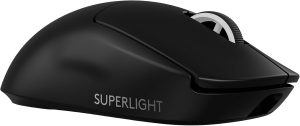
Logitech G PRO X Superlight 2 |
60g |
44,000 DPI |
Wireless |
Up to 95 hours |
Ultra-light esports performance |
Competitive gaming |
Razer Viper V3 HyperSpeed |
82g |
30,000 DPI |
Wireless |
Up to 280 hours |
Fast wireless response |
Esports & PvP |
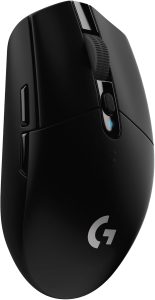
Logitech G305 Lightspeed |
99g (with battery) |
12,000 DPI |
Wireless |
Up to 250 hours |
Affordable wireless gaming |
Budget gamers |
Razer Basilisk V3 X HyperSpeed |
110g |
18,000 DPI |
Wireless/Bluetooth |
Up to 285 hours |
Ergonomic comfort & customization |
All-around gaming |
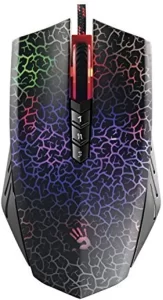
Bloody A70 II |
138g |
8,000 DPI |
Wired |
N/A |
Ultra-fast optical switches |
High CPS butterfly clicking |
Best Picks
Best Overall: Logitech G PRO X Superlight 2
Best Budget Option: Logitech G305 Lightspeed
Best For High CPS: Bloody A70 II
Best Ergonomic Choice: Razer Basilisk V3 X HyperSpeed
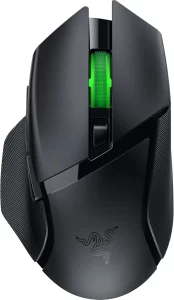
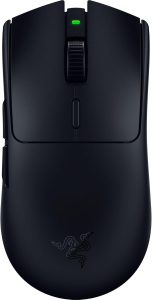
Best For Competitive Gaming: Razer Viper V3 HyperSpeed
Best Mouse for Butterfly Clicking Reviews
1. Logitech G Pro X Superlight 2
2. Razer Viper V3 HyperSpeed
The Razer Viper V3 HyperSpeed is an excellent choice for butterfly clicking thanks to its lightweight 82g design, responsive Gen-2 mechanical switches, and highly accurate Focus Pro 30K optical sensor.
Designed for competitive esports players, it delivers smooth tracking and fast click response that works well for high-CPS gameplay and fast-paced PvP matches.
Its symmetrical shape provides a comfortable grip for various hand sizes, while the HyperSpeed wireless connection ensures low-latency performance during intense gaming sessions.
One of its biggest strengths is the impressive battery life of up to 280 hours using a single AA battery, making it highly reliable for long-term use.
Although it is slightly heavier than ultra-light premium mice, the overall balance and performance make it a strong option for butterfly clicking enthusiasts.
Pros
- Lightweight 82g design
- Excellent for butterfly clicking and competitive gaming
- Accurate Focus Pro 30K optical sensor
- Fast and responsive Gen-2 mechanical switches
- Extremely long battery life
- Reliable HyperSpeed wireless connection
- Comfortable symmetrical shape
- Affordable compared to premium esports mice
Cons
- Uses an AA battery instead of a rechargeable battery
- Slightly heavier than ultra-light mice
- No RGB lighting
- Limited customization without Razer Synapse software
3. Logitech G305 Lightspeed
4. Razer Basilisk V3 X HyperSpeed

Butterfly clicking is a popular clicking technique used by gamers to achieve extremely high CPS (clicks per second).
To master butterfly clicking, you need a mouse with the right features, including a responsive sensor, durable switches, and an ergonomic design.
We will cover the essential factors to consider when choosing the best mouse for butterfly clicking.
Key Factors to Consider
1. Switch Type and Durability
Butterfly clicking involves rapid and repeated pressing of the mouse buttons. This requires switches that are durable and highly responsive. Look for:
- Optical or Mechanical Switches – Optical switches offer faster actuation and longer lifespan, while mechanical switches provide a tactile feel.
- High Click Durability – Switches rated for at least 20 million clicks ensure longevity.
- Low Actuation Force – Lighter switches allow for faster clicking without excessive force.
2. Polling Rate
The polling rate determines how often the mouse sends data to the computer. A higher polling rate ensures smoother tracking and faster response times.
- 1000Hz is standard for gaming mice, but some advanced models feature 8000Hz for extreme precision and minimal input lag.
3. DPI and Sensor Precision
DPI (dots per inch) determines how sensitive the mouse is to movement. A high-quality optical sensor is crucial for accuracy.
- Adjustable DPI settings help fine-tune sensitivity for different gaming situations.
- A sensor with high IPS (inches per second) tracking ensures smooth and precise movements.
4. Ergonomic Design and Weight
The shape and weight of the mouse can impact comfort and performance.
- Lightweight design (under 70g) is ideal for fast movements and extended gaming sessions.
- Ergonomic shape should fit your hand size and grip style (palm, claw, or fingertip grip).
- Ambidextrous design is great for left- and right-handed users.
5. Connectivity Options
- Wired Mice – Offer consistent performance and no battery concerns.
- Wireless Mice – Modern wireless gaming mice feature low-latency 2.4GHz connections for near-instant responsiveness.
6. RGB and Customization Features
Some mice allow for customizable RGB lighting and software adjustments, which can enhance your gaming experience.
- Onboard Memory for saving custom settings.
- Adjustable debounce time to optimize double-click speed for butterfly clicking.
Conclusion
The best mouse for butterfly clicking depends on your gaming style, budget, and comfort preferences.
A quality butterfly clicking mouse can improve reaction speed, consistency, and overall gaming performance. Focus on comfort and switch quality first, then choose the features that best fit your playstyle.
Frequently Asked Questions
Is it permissible to use butterfly clicking in every online game?
Ans: No, butterfly clicking is not allowed in all online games. Some games, especially competitive ones like Minecraft and shooter games, may have click speed limits or anti-cheat systems that detect and restrict high CPS (clicks per second) methods like butterfly clicking. Always check the game’s rules before using it.
Can butterfly clicking cause any damage to your mouse?
Ans: Yes, butterfly clicking can cause wear and tear on your mouse switches faster than normal use, especially if the switches are not designed for high CPS (clicks per second). Durable switches like Kailh or Omron last longer and are better suited for this technique.
Can you butterfly click with any mouse?
Ans: Not all mice are suitable for butterfly clicking. You need a mouse with durable, responsive switches, a flat and wide click surface, and no debounce delay for optimal performance. Gaming mice with Omron or Kailh switches work best.
Most Popular Posts:
Is Butterfly Clicking Good for PVP?
Is Kohi Clicking Butterfly Clicking? Fastest Way To Click Now