
First-person shooter (FPS) games demand precision, speed, and responsiveness. Choosing the right gaming mouse can significantly enhance your performance, giving you an edge in competitive gameplay.
So what should you look for in a gaming mouse for FPS?
In this article, we’ll discuss these features and more to help you find the perfect gaming mouse for FPS games.
Why You Need a Good Gaming Mouse for FPS
Here are a few reasons why it is important to get yourself a good gaming mouse for FPS:
Precision and Accuracy
First-person shooter games require precise and accurate movements, and a high-quality gaming mouse can help you achieve this. A good gaming mouse for FPS will offer a higher DPI (dots per inch), allowing you to move your cursor faster and more accurately.
Customization
Many gaming mice come with customizable buttons that allow you to assign specific functions to different buttons. In FPS games, this can be a game-changer. You can program buttons for quick weapon changes, crouching, or jumping, giving you an edge in fast-paced situations.
Faster Response Time
In FPS games, split-second decisions and reactions can be the difference between winning and losing. A gaming mouse for FPS with a high polling rate can provide a faster response time, allowing you to react more quickly to in-game events.
Durability
Gaming mice are built to last, with sturdy construction that can withstand hours of intense gaming sessions. This means you won’t have to worry about your mouse breaking down or malfunctioning in the middle of a game, giving you peace of mind and allowing you to focus on your performance.
Ergonomics
Finally, a good gaming mouse for FPS will be designed with ergonomics in mind, ensuring that it’s comfortable to use for extended periods. This is especially important for FPS gamers, who may spend hours at a time playing.
8 Key Things to Look for in a Gaming Mouse for FPS
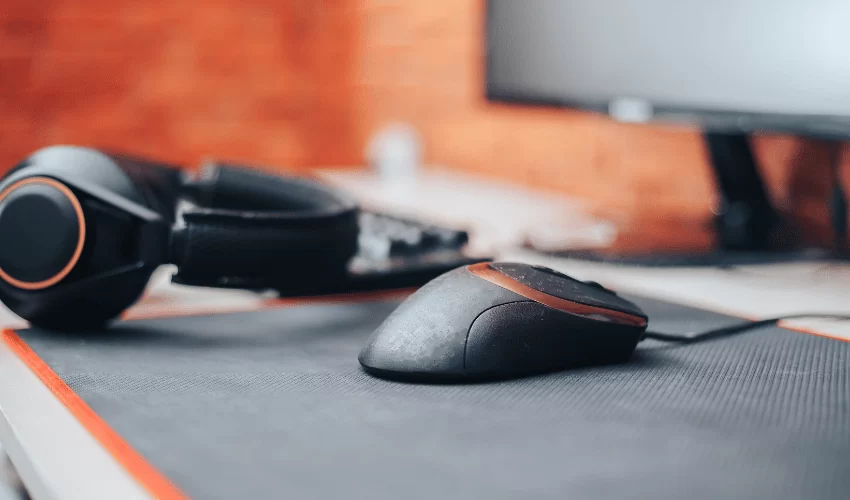
Some of the key factors to consider when looking for a gaming mouse for FPS include:
- Weight
The weight of your gaming mouse can play a significant role in your gaming performance.
A mouse that’s too heavy can be difficult to maneuver quickly, while a mouse that’s too light can lack the precision and stability needed for accurate shots.
Choose a gaming mouse for FPS with a weight that feels comfortable in your hand and allows you to move it with ease.
Also Read: Are Lighter Mice Better for FPS Games?
- DPI and Sensors
A mouse’s DPI (dots per inch) determines how sensitive it is to move, and a higher DPI can provide greater precision and accuracy in FPS games.
Additionally, advanced sensors can track even the smallest movements, ensuring that your cursor responds accurately to your hand movements.
Get a gaming mouse for FPS with a high DPI and advanced sensors for the best in-game performance.
- Size and Shape
The size and shape of your gaming mouse can impact your comfort and accuracy while gaming. Look for a mouse that fits comfortably in your hand and is designed to support your grip style, whether that’s palm, claw, or fingertip.
Also, consider the size and weight of the mouse to ensure that it’s easy to maneuver and doesn’t cause hand fatigue during long gaming sessions.
- Lift-Off Distance
The lift-off distance of your gaming mouse refers to how high it can be lifted off the surface before it stops tracking movement.
In FPS games, this can be important when you need to quickly reposition your mouse without losing accuracy. Look for a gaming mouse for FPS with a low lift-off distance for the best in-game performance.
- Customization
Customizable buttons and software can be a game-changer in FPS games, allowing you to assign specific functions to different buttons and create macros for complex actions.
Get a gaming mouse that offers customization options, such as programmable buttons, adjustable DPI settings, and customizable lighting.
This can give you a significant advantage in fast-paced games by allowing you to quickly execute complex actions with ease.
- Wired vs Wireless
While wireless gaming mice can be more convenient, they can also have a higher latency, which can affect your in-game performance.
If you prefer wired gaming mice, get one with the lowest latency and best performance. If you like the wireless option, be sure to look for a mouse with a high polling rate and low latency.
- Durability
Gaming mice for FPS are subject to a lot of wear and tear, so it’s important to look for a mouse that is durable and built to last. Look for a mouse with sturdy construction, high-quality materials, and a long warranty.
- Price
Gaming mice can vary greatly in price, from budget options to high-end models. While a more expensive mouse can offer advanced features and better performance, it may not always be necessary.
Consider your budget and buy a mouse that offers the features you need at a price point that’s comfortable for you.
Keep in mind that a high-quality gaming mouse can be a worthwhile investment for serious gamers, as it can improve your in-game performance and overall gaming experience.
Best Gaming Mouse for FPS Comparison Table
Mouse |
Weight |
Max DPI |
Connectivity |
Battery Life |
Best Feature |
Best For |
|---|---|---|---|---|---|---|
Logitech G PRO X Superlight 2 |
60g |
44,000 DPI |
Wireless |
Up to 95 hours |
Ultra-lightweight design with 8kHz polling |
Professional FPS gaming |
Razer Viper V3 HyperSpeed |
82g |
30,000 DPI |
Wireless |
Up to 280 hours |
Focus Pro 30K sensor & HyperSpeed Wireless |
Competitive FPS & esports |
Logitech G305 Lightspeed |
99g (with battery) |
12,000 DPI |
Wireless |
Up to 250 hours |
Excellent value with HERO sensor |
Budget FPS gaming |
Razer Basilisk V3 X HyperSpeed |
110g |
18,000 DPI |
Wireless/Bluetooth |
Up to 285 hours |
Ergonomic shape with 9 programmable buttons |
FPS & MMO hybrid gaming |
Bloody A70 II |
138g |
8,000 DPI |
Wired |
N/A |
Ultra-fast Light Strike optical switches |
Budget FPS & rapid-fire gameplay |
Best Picks
- Best Overall: Logitech G PRO X Superlight 2
- Best Budget Option: Logitech G305 Lightspeed
- Best for Competitive FPS: Razer Viper V3 HyperSpeed
- Best Ergonomic FPS Mouse: Razer Basilisk V3 X HyperSpeed
- Best Budget Wired FPS Mouse: Bloody A70 II
Best Gaming Mouse for FPS Reviews
As an Amazon Associate, we earn from qualifying purchases
1. Logitech G PRO X Superlight 2
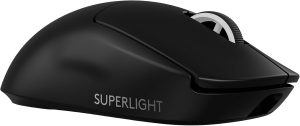
The Logitech G PRO X Superlight 2 is one of the best gaming mice for FPS players, offering an ultra-lightweight 60g design that enables quick flick shots and effortless tracking.
Built with Logitech’s HERO 2 sensor featuring up to 44,000 DPI and an 8kHz polling rate, it delivers exceptional precision and responsiveness for competitive shooters.
Its LIGHTFORCE hybrid switches provide crisp, reliable clicks, while the smooth PTFE feet allow effortless gliding across the mouse pad.
Combined with up to 95 hours of battery life and USB-C charging, it’s an outstanding choice for esports professionals and serious FPS gamers.
Pros
- Ultra-lightweight 60g design
- HERO 2 sensor with up to 44,000 DPI
- 8kHz polling for ultra-low latency
- Extremely accurate tracking
- Comfortable ambidextrous shape
- Long 95-hour battery life
- Smooth PTFE feet
- Premium build quality
Cons
- Premium price
- No RGB lighting
- Only 5 programmable buttons
- Lightweight feel may not suit everyone
2. Razer Viper V3 HyperSpeed
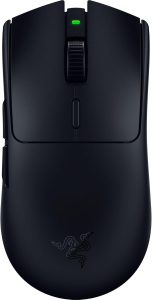
The Razer Viper V3 HyperSpeed is designed specifically for competitive FPS players who demand speed, precision, and reliability.
Its lightweight 82g frame, Focus Pro 30K optical sensor, and HyperSpeed Wireless technology provide outstanding responsiveness for fast-paced shooters like Valorant, CS2, Apex Legends, and Call of Duty.
The symmetrical design suits multiple grip styles, while the Gen-2 mechanical switches deliver satisfying, responsive clicks. With up to 280 hours of battery life, it’s an excellent choice for gamers who prefer long-lasting wireless performance.
Pros
- Lightweight 82g design
- Excellent Focus Pro 30K sensor
- Reliable HyperSpeed wireless
- Comfortable symmetrical shape
- Up to 280-hour battery life
- Fast mechanical switches
- Great value for competitive FPS
- 8 programmable buttons
Cons
- Uses AA battery
- Slightly heavier than flagship ultralight mice
- No RGB lighting
- Requires Synapse for full customization
3. Logitech G305 Lightspeed
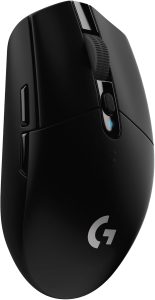
The Logitech G305 Lightspeed is one of the best budget gaming mice for FPS games. Powered by Logitech’s HERO sensor and LIGHTSPEED wireless technology, it offers impressive accuracy and low-latency performance without the premium price tag.
Its compact shape makes it easy to control during quick flicks and tracking movements, while the remarkable 250-hour battery life ensures weeks of uninterrupted gaming.
Pros
- Excellent value
- Responsive LIGHTSPEED wireless
- Accurate HERO sensor
- Compact and portable
- Up to 250-hour battery life
- On-board memory
- Durable switches
- Great entry-level FPS mouse
Cons
- Uses AA battery
- Smaller shape may not suit large hands
- No RGB lighting
- Slightly heavier than ultralight competitors
4. Razer Basilisk V3 X HyperSpeed
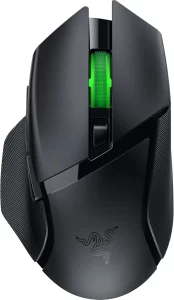
The Razer Basilisk V3 X HyperSpeed is an excellent FPS mouse for players who prioritize comfort and customization. Its ergonomic shape supports long gaming sessions, while the 5G Advanced 18K optical sensor ensures smooth and accurate tracking.
With dual wireless connectivity, 9 programmable buttons, and Chroma RGB support, it offers plenty of flexibility for gamers who play both FPS and other genres.
Pros
- Comfortable ergonomic design
- Accurate 18K optical sensor
- Responsive Gen-2 switches
- HyperSpeed Wireless & Bluetooth
- Up to 285-hour battery life
- 9 programmable buttons
- RGB lighting
- Excellent all-around performance
Cons
- Heavier than esports-focused mice
- Uses AA battery
- Large shape may not fit smaller hands
- RGB shortens battery life
5. Bloody A70 II
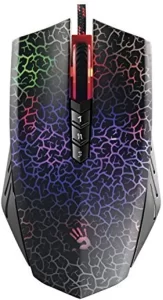
The Bloody A70 II is a solid wired gaming mouse for FPS players on a budget. Its Light Strike optical switches provide an incredibly fast 0.2ms click response, while the optical sensor delivers consistent tracking during fast movements.
Although heavier than modern ultralight mice, its responsive switches, programmable buttons, and durable construction make it a reliable choice for gamers who prefer wired performance.
Pros
- Ultra-fast 0.2ms optical switches
- Responsive optical sensor
- Fully programmable buttons
- Durable construction
- Smooth X’Glide feet
- Reliable wired connection
- Great value
- Excellent click responsiveness
Cons
- Heavier than modern FPS mice
- Wired only
- Software can be confusing
- Older design compared to newer competitors
Buying Guide: How to Choose the Best Gaming Mouse for FPS
When shopping for an FPS gaming mouse, consider these key factors:
- Weight: Lighter mice (50–80g) allow faster flick shots and reduce fatigue.
- Sensor Quality: Look for a modern optical sensor with flawless tracking and at least 20,000 DPI (high DPI isn’t necessary for gameplay but reflects sensor capability).
- Polling Rate: A 1,000Hz polling rate is standard, while 4,000Hz or 8,000Hz can reduce input latency on supported systems.
- Shape & Grip: Choose a mouse that matches your preferred grip style—palm, claw, or fingertip.
- Wireless Performance: Modern wireless mice offer latency comparable to wired models while providing greater freedom of movement.
- Programmable Buttons: FPS gamers typically need only a few well-placed buttons, whereas players of multiple genres may benefit from additional customization.
- Battery Life: For wireless models, longer battery life means fewer interruptions during gaming sessions.
By balancing comfort, precision, weight, and responsiveness, you can choose an FPS gaming mouse that enhances your aim and overall performance.
Logitech G Pro X Superlight: Best Settings for FPS Games
Frequently Asked Questions
Where can I buy a gaming mouse for FPS?
You can buy a gaming mouse for FPS from a variety of retailers, both online and in-store. Popular options include Amazon, eBay, and gaming specialty stores. Be sure to check customer reviews and do your research before making a purchase.
What important factors should I consider when buying a mouse for FPS?
When buying a mouse for FPS, some important factors to consider include weight, DPI and sensors, size and shape, lift-off distance, customization options, wired vs wireless, durability, and price. Consider your own preferences and gaming style to determine which features are most important to you.
Is DPI important for FPS gaming?
Yes, DPI can be important for FPS gaming, as it determines how sensitive your mouse is to movement. A higher DPI can provide greater precision and accuracy in FPS games, allowing you to make more precise shots and movements.
How do I know if my mouse is good for gaming?
A good gaming mouse should have a comfortable weight and shape, advanced sensors, customizable options, a low lift-off distance, and be built to last. Additionally, it should provide a smooth and accurate experience in FPS games. Look for a mouse that has positive customer reviews, as well as features that match your gaming style and preferences.